Problem
Most jobs in a LinkedIn search aren't a fit. The seniority is off, the location doesn't work, the pay is too low, or there's a dealbreaker halfway down the description. You only find out by opening each one. I wanted every job tagged before I clicked it, judged against my own CV and preferences, with my data staying in my browser.
Intervention
JobTier is a Chrome extension built on Manifest V3, TypeScript and Preact. You add your profile (from a CV, your LinkedIn profile or plain text), along with your preferences and any dealbreakers. As you browse LinkedIn, each job gets one of five tiers (Ignore, Possible, Good, Great or Ideal), a confidence score, and ratings for skills, seniority, location and salary.
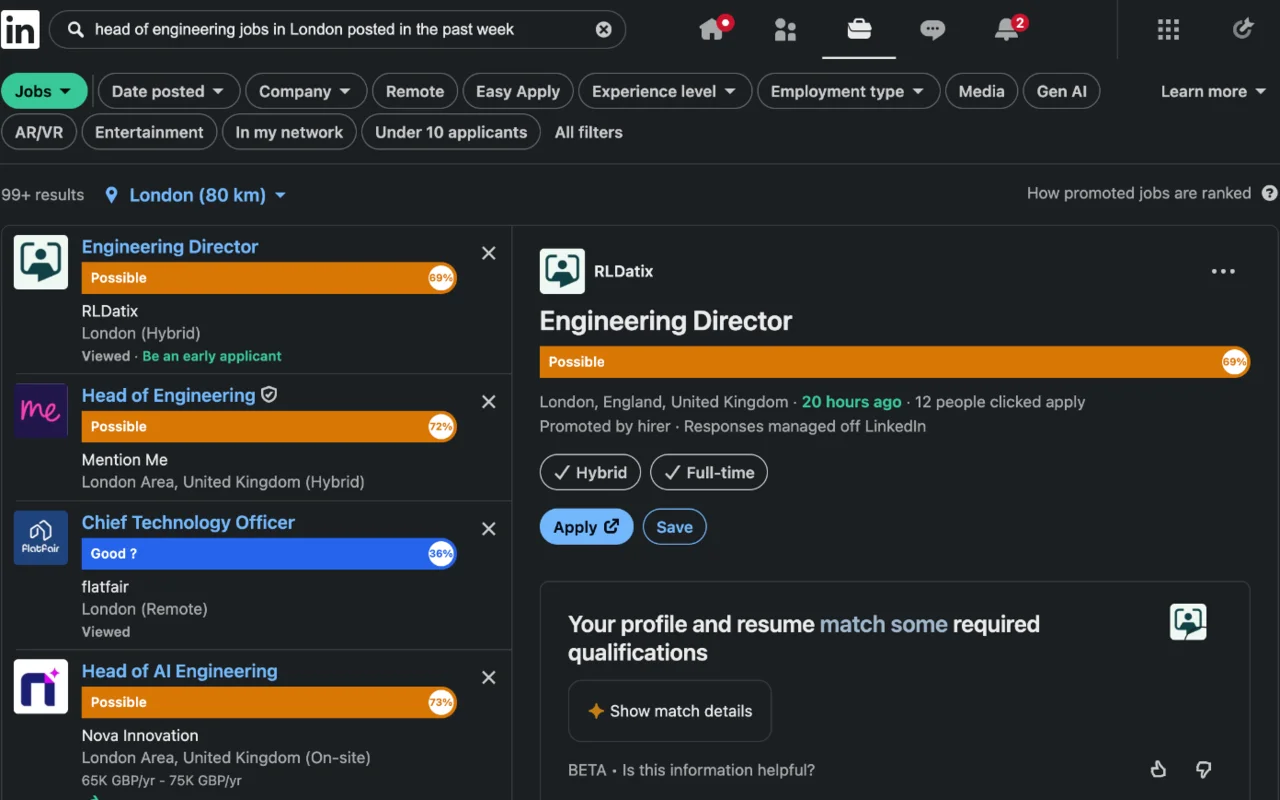
JobTier on LinkedIn's AI job search. Each card gets a tier and confidence score, and so does the open job on the right.
The scoring is done by Jev, TypeSafe's decision model. Jev doesn't write text. You send it a structured state and a set of named questions, and it grades each question on a scale you define, with a confidence, or gives the probability that a statement is true. That suits this job well, as there's nothing to parse afterwards.
JobTier makes one request per job. The state has a candidate object (profile text, target roles, location, workplace preference and minimum salary) and a job object (title, company, location, workplace type, salary and description), and each question names the fields it should look at. The overall fit question uses a five-level scale where each level is a tier, defined in a line, from "Ignore: wrong field or severe mismatch" up to "Ideal: excellent match on skills, seniority, location and pay". Jev's grade is the tier, and its confidence is the percentage on the badge. Skills, seniority and location are graded poor, partial or strong. Salary is only asked about if you've set a minimum, and its scale includes "not stated", because plenty of ads leave pay out. Each dealbreaker is asked as a separate yes or no question and comes back as a probability.
Jev's answers then go through a small set of rules in the extension. A dealbreaker that comes back at 70% or more makes the job Ignore, regardless of the overall grade. A confidence below 50% adds a question mark to the tier. The short reason shown with each job, such as "strong skills, partial seniority", comes from the highest and lowest ratings. Keeping these decisions in code means every tier can be explained, and the rules have their own tests.
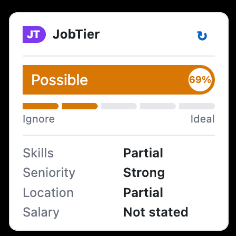
The panel for the open job: Jev's overall grade as the tier and meter, its confidence, and the four ratings.
Most of the cost control happens before a request is sent. Long profiles and job descriptions are trimmed to fit Jev's context window. Scores are cached in the browser, keyed on a hash of the profile, preferences, provider and model, so editing your profile or preferences triggers a rescore. Ignore scores are kept for a week and everything else for a day. Jobs more than two weeks old are marked Ignore without calling Jev. Users can connect to Jev directly through TypeSafe or via OpenRouter, using their own API key.
A few other decisions came from wanting the extension to be trustworthy and cheap to run. API keys stay in a background worker. The script running on LinkedIn never reads them, and only the worker talks to Jev. Cards are scored as they come into view, in the order you scroll to them, so jobs you never see cost nothing, and a daily limit caps paid requests. Job postings load two at a time, roughly a second apart, with back-off on rate limits, timeouts, and a slower option in settings. The usual build tooling also loads content-script code from files any website can request, which is an easy way for a site to spot an extension, so I rebuilt the LinkedIn script as a single self-contained file with nothing to request.
Speed was the first real problem. Pages that should have scored almost immediately were slow, so I logged how long each stage took for every job. The logs showed the lookup for saved scores taking nearly two seconds, because every card was reading the cache separately. Sharing one read fixed it.
LinkedIn was the second. It's moving from classic job search to an AI search layout with no headings or stable class names, and its markup changes often. Along the way I found an Easy Apply button carrying the job's ID, a job title in plain text, and a nav item that briefly matched the page title while switching jobs. Each fix has a test, and card detection is tested against real LinkedIn pages, captured and stripped of personal data, with every test checked to fail when the thing it covers breaks.
None of that LinkedIn knowledge leaks into the rest of the extension. Finding jobs on the page, reading a posting and placing the badges all sit behind a single site adapter, so adding another job board means writing a new adapter, not reworking the scoring. Other popular UK job boards are next.
Result
JobTier tags job cards, the open job in the details pane and full job pages across both of LinkedIn's search layouts, so I can go straight to the jobs worth reading and hide the rest. It's free, and the only data that leaves the browser is the scoring request itself. LinkedIn is the first site, with more to follow. It's published by Cleansheet. You can add it from the Chrome Web Store, and there's more on the JobTier product page.